Monitor Computers and Containers
The Computers section displays all machines registered on the platform, across all organizations. It covers computers and containers, showing their key information: name, type, OS, version, IP address, signaling server, status, and managing organization.
Administrative tasks and user access management are handled in the Organizations section — see Manage Workstations.
Access: verified_user Admin Area > dashboard General > tv Computers.
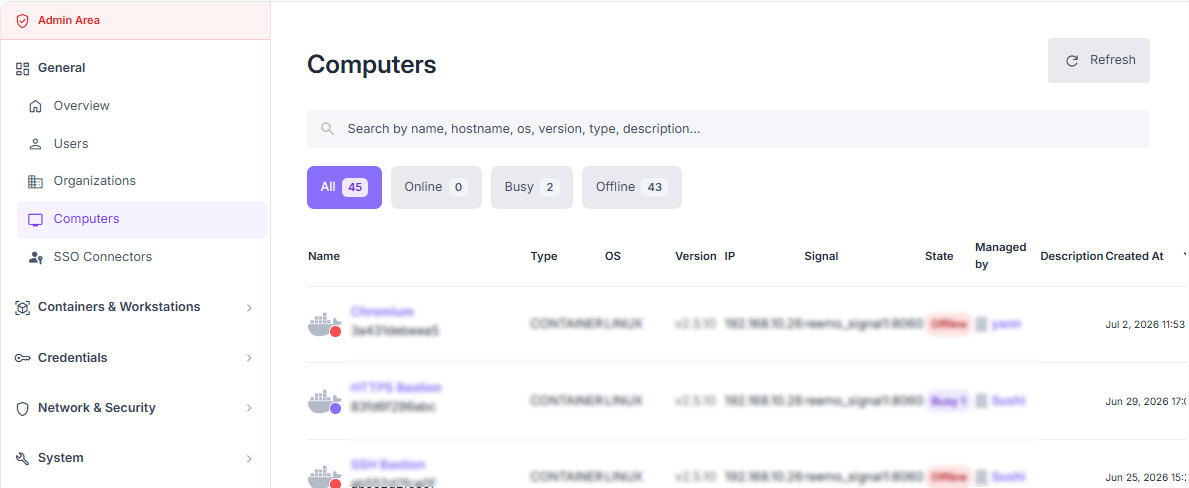
Overview of computers registered on the platform.
The columns display:
Name and hostname
Type: computer or container
OS and Reemo agent version
IP address
Signal: associated signaling server
Status: Online, Busy, Offline
Managed by: managing organization
Description and creation date
The search bar allows filtering by name, hostname, IP address, OS, version, type, or description.
View a Computer Profile
Access: verified_user Admin Area > dashboard General > tv Computers > computer name.
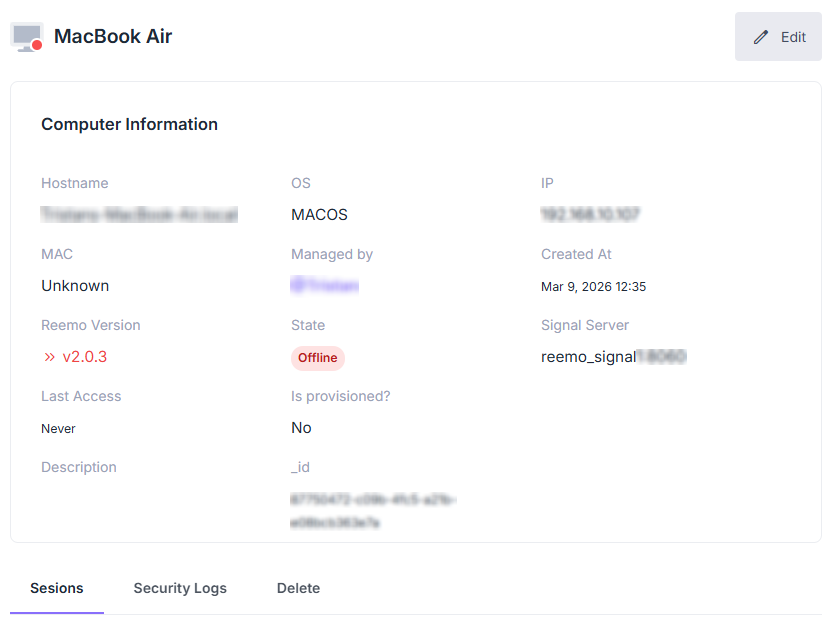
Computer profile with technical information.
The profile displays the machine’s technical information: hostname, OS, IP address, MAC address, signaling server, agent version, provisioning status, and maintenance mode.
Available actions
Edit : modifies the machine’s information.
Reinstall : reinstalls the Reemo agent on the machine.
Reset : resets the machine registration.
Available tabs
Sessions: remote session logs — see Activity (Sessions).
Security Logs: history of security events.
Delete: permanently deletes this computer.