Configuration Variables
Variables make it possible to customize the container’s behavior. They serve two main roles:
Environment variables: injected directly into the container at startup.
Dynamic form: define the fields in the configuration form of container profiles on the organization side. Organization administrators can then configure options (text fields, checkboxes, dropdown lists, etc.) defined in advance by the instance administrator.
Important
Only variables marked as editable appear in the configuration form on the organization side.
Other variables are hidden from organization administrators and transmitted internally to the container.
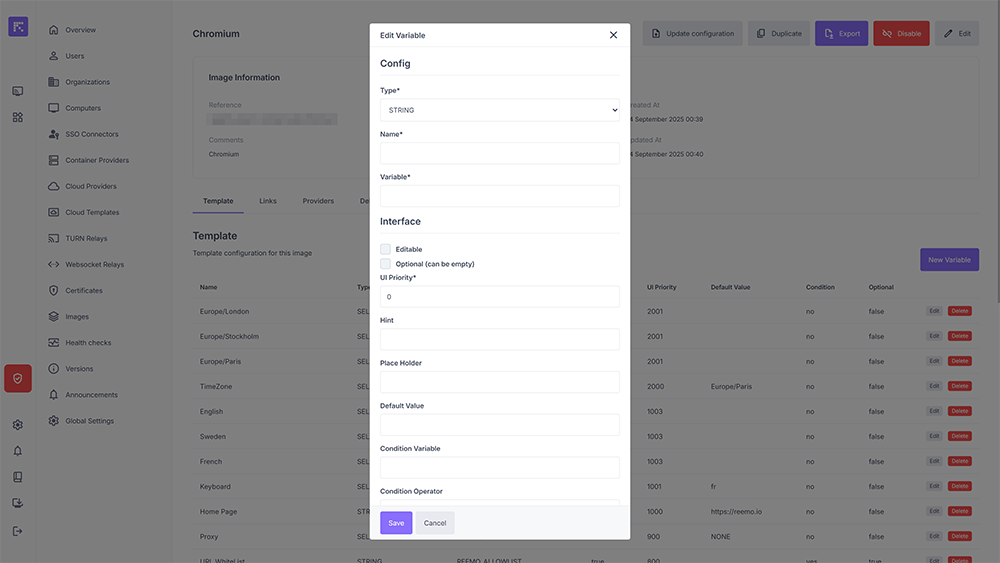
Variable configuration and associated properties.
Tip
UI Priority: Each variable has a display priority. The higher the value, the higher the field appears in the options form. This allows organizing the options in a specific and logical order.
Options
Type
The template type. Different types have different purposes: some are designed to be configurable via profiles, others are static.
STRING: text
BOOLEAN: true/false (checkbox)
SELECT: dropdown menu
SELECT_OPTION: dropdown option
SECRET: Docker Swarm secret
HOST: adds an entry to the container’s /etc/hosts file
Name
The variable name displayed in a profile.
Variable
The environment variable name that will be sent to the container (-e option in the Docker command line).
Editable
Makes this variable editable by organization admin accounts.
UI Priority
Allows organizing the fields of a profile. The higher the UI priority, the higher the field appears in the profile. Also used to order SELECT_OPTION values, where the highest value appears first in the list.
Hint
Explanatory text displayed under the template field in a profile.
Place Holder
Placeholder text displayed in grey in a text field to give an example without filling it in.
Default Value
The default value when creating a profile.
Condition Variable + Condition Operator + Condition Value
Allows applying a condition on the use of a template based on the value of another template and an operator. For example, if you want the field TEMPLATE_1 to appear only if TEMPLATE_2 == true, you can configure TEMPLATE_1 as:
Examples
Name: Home Page
Type: STRING
Variable: REEMO_HOME
Editable: true
UI Priority: 1000
Default Value: https://reemo.io
This field appears at the top of a profile, is called Home Page, has default value https://reemo.io, and sets the environment variable REEMO_HOME in the container.
Name: REEMO_NO_PROXY
Type: STRING
Variable: REEMO_NO_PROXY
Editable: false
Default value: true
Condition: REEMO_PROXY EQUAL NONE
This field does not appear in a profile because it is not editable, but sets the environment variable REEMO_NO_PROXY=true if REEMO_PROXY == NONE.
Name: REEMO_NO_PROXY (again)
Type: STRING
Variable: REEMO_NO_PROXY
Editable: false
Default value: true
Condition: REEMO_PROXY EQUAL EXTERNAL
This field also does not appear in a profile but sets the environment variable REEMO_NO_PROXY=true if REEMO_PROXY == EXTERNAL.
Name: Embedded Proxy
Type: SELECT_OPTION
Variable: REEMO_PROXY
Value: EMBEDDED
UI Priority: 9
This is an option of the REEMO_PROXY dropdown. It appears second in the list because its priority value is between 8 and 10 of the other two options. If selected, it sets REEMO_PROXY=EMBEDDED.