Activity (Sessions)
Activity logs allow you to view the history of remote connections within the organization. They are accessible from three locations:
The Sessions page (global view)
A computer profile
A user profile
Global View
The Sessions page shows the history of all connections made within the organization.
Access: domain Organization > dashboard General > article Sessions.
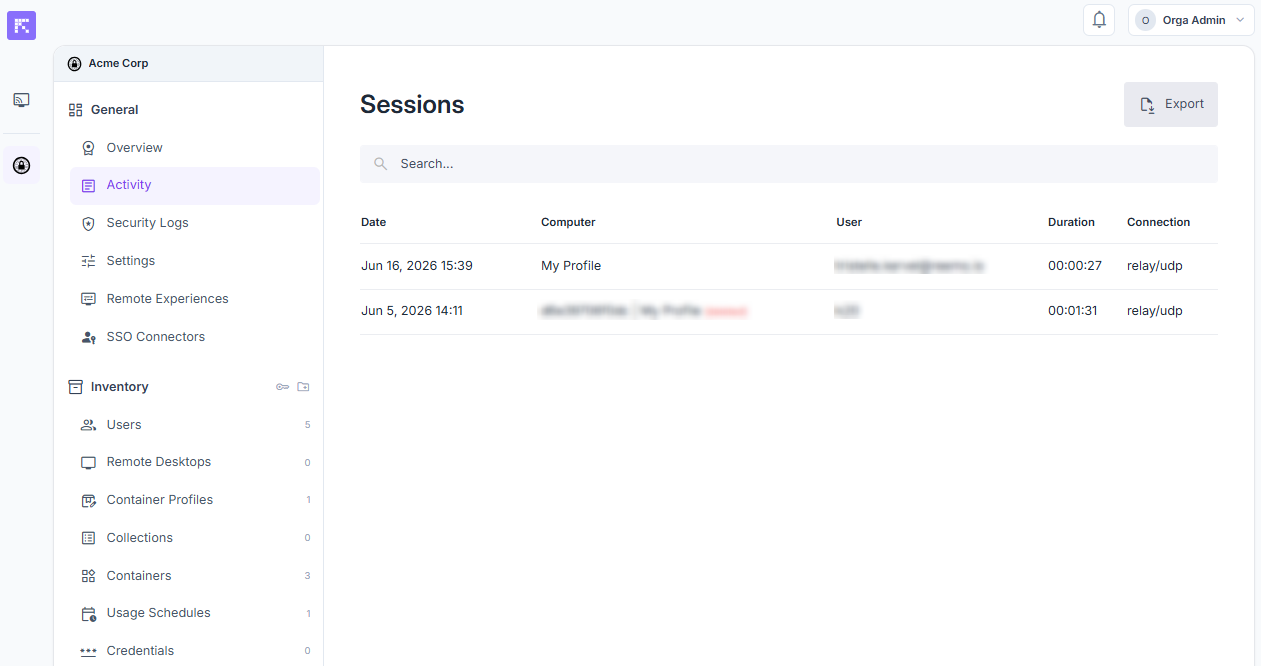
Global view of the organization’s activity logs.
Available columns:
Date: date and time of session start.
Computer: name of the computer concerned.
User: user who initiated the session.
Duration: total connection duration.
Connection: connection type (e.g. direct/udp).
An Export button is available to download the logs (CSV/Excel).
Computer View
Access: inventory_2 Inventory > tv Remote Desktops > computer name > Sessions tab.
The logs list all connections made to that machine.
Available columns:
Date: date and time of the remote session start.
User: user who initiated the session.
Duration: total connection duration.
Computer IP: IP address of the remote computer.
Client IP: IP address of the connecting client.
User View
Access: inventory_2 Inventory > group Users > user name > Sessions tab.
The logs list all connections made by that user.
Available columns:
Date: date and time of session start.
Computer: name of the computer used.
Duration: total connection duration.
Organization: organization the session belongs to.
Computer IP: IP address of the remote computer.
Client IP: IP address of the connecting client.
Connection type: connection type (e.g. direct/udp).