Getting Started
The instance administrator has a dedicated space called the Admin Area, which allows them to manage the entire Reemo infrastructure (users, organizations, computers, connectors, licenses, etc.).
Accessing the Admin Area
A shield icon (1), always visible in the thin sidebar, provides access to the Admin Area — reserved for instance administrators. It remains accessible at all times, including once inside the Admin Area.
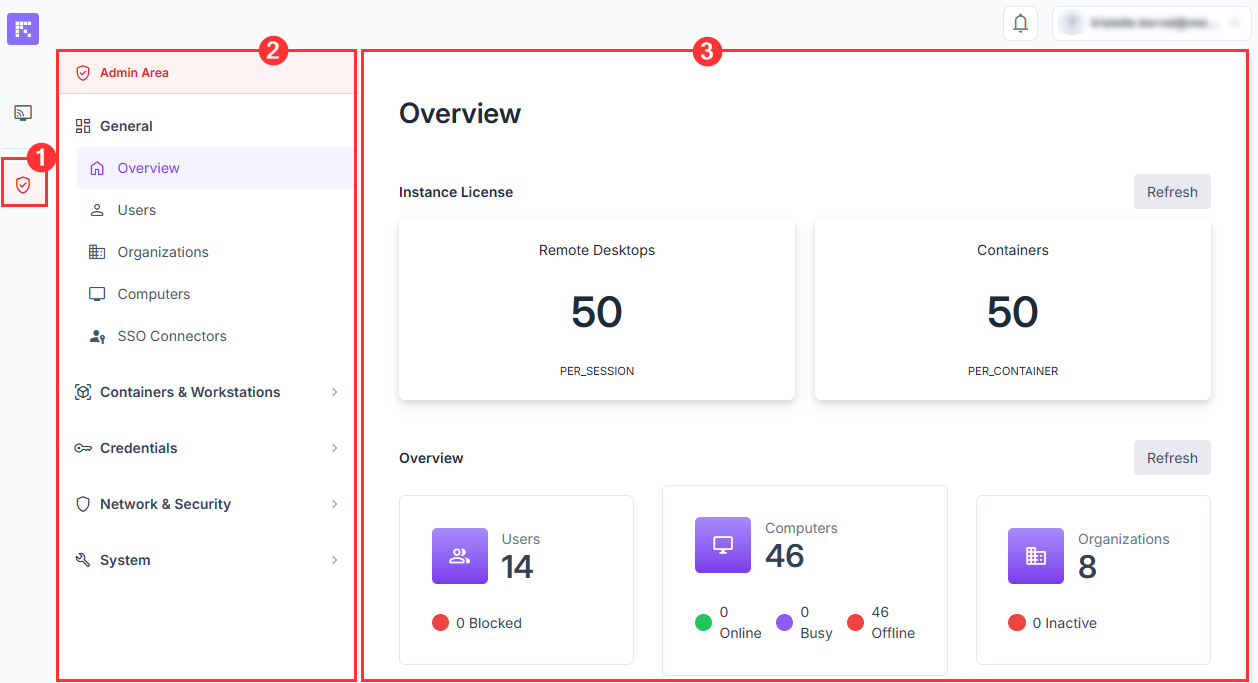
(1) Access to the Admin Area, (2) Navigation menu, (3) Main view.
The administration area is divided into two main sections:
(2) Navigation menu (left column): provides access to all configuration and monitoring sections (users, organizations, machines, licenses, etc.).
(3) Main view: displays the information and dashboards related to the selected section.
Recommended Steps to Get Started
Check available licenses in the Overview section.
Configure your instance.
Create an organization in the Organizations tab.
Set up security and authentication (SSO Connectors, Certificates).
Monitor activity and health via Health checks and Versions.