Access Requests
The approval workflow restricts connection to a resource until an approver grants an access request submitted by a standard user. Organization administrators bypass this workflow and connect directly; instance administrators do not.
Access: domain Organization > inventory_2 Inventory > lock Access Requests.
Organization and instance administrators configure the workflow:
Approvers are assigned per resource — see Manage Workstations.
Requests expire after a duration set at the organization level by default, or overridden per resource — see Security Settings.
Instance administrators can configure email and webhook notifications for new requests — see Configure Your Instance.
Once configured, here is how a request plays out:
The user submits an access request.
Approvers are notified.
An approver approves or rejects it.
If approved, the user connects.
See Requesting Access to a Restricted Resource for the full request flow.
The Access Requests page centralizes every access request submitted for the organization’s protected resources, scoped to organization and instance administrators — see My Approvals for an approver’s personal view.
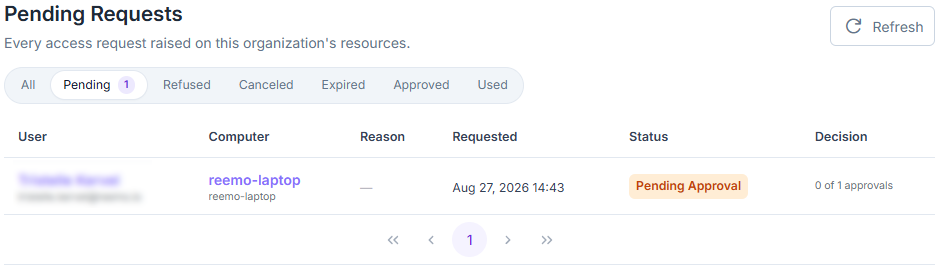
Access Requests page.
Each request lists the requesting user, the target machine, the reason given, and its status — and, for instance administrators, the organization it belongs to. Filter the list using the status chips above the table: All, Pending, Approved (granted, not yet connected), Used (connected), Refused, Canceled, or Expired.
This page is read-only: approving or rejecting a request is done from My Approvals, available to the resource’s assigned approvers.
Note
A request needs as many approvals as configured in the resource’s Required approvals setting — see Manage Workstations. A single rejection sets the request to Refused immediately, regardless of any other pending approvals.
See also
Manage Workstations — Configure approvers and the approval quorum for a specific workstation.
See also
Security Settings — Set the organization’s default access request expiration.