Access Requests
Follow the access requests submitted for the organization’s protected resources, and revoke an access if necessary.
Access: domain Organization > inventory_2 Inventory > lock Access Requests.
To set up the workflow and understand the flow of a request, see Approval Workflow.
This page is reserved for organization and instance administrators: see My Approvals for an approver’s personal view.
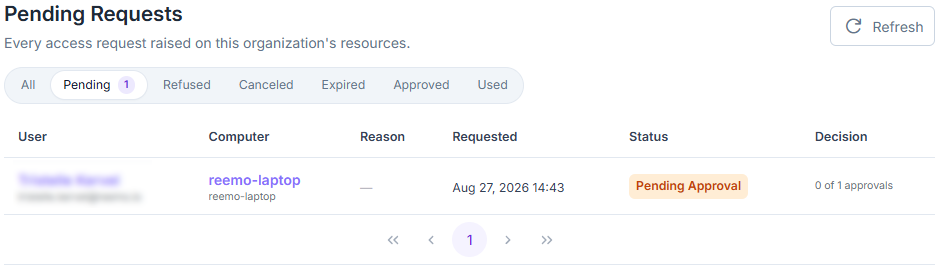
Access Requests page.
Each request lists the requesting user, the target machine, the reason given, its status and the decision made — and, for instance administrators, the organization it belongs to. Filter the list using the status chips above the table: All, Pending, Approved (granted, not yet connected), Used (connected), Refused, Canceled, Expired, or Revoked.
The Reason column also shows the answers to the connection form, and a badge flags a scheduled request (For, followed by the planned day and time) or a session extension request (Extension, followed by the requested duration).
Approving or rejecting a request is done from My Approvals, available to the resource’s assigned approvers.
To configure a resource’s approvers and approval quorum, see Configure Approval for a Resource. To set the expiration and the other default rules for requests, see Approval Workflow.
Revoke an Approved Request
Withdraw an access that was already granted, for example if the request is no longer relevant or an ongoing session must stop.
Open domain Organization > inventory_2 Inventory > lock Access Requests.
Find the Approved or Used request, then click Revoke.
Add an optional comment, then confirm.
The request becomes Revoked; the author of the revocation, the date and the comment are kept in the Decision column and in the security logs. The open session is cut automatically, with a dedicated message for the user, who can no longer reconnect with this request. A pending extension request on that session is canceled.
Organization administrators revoke any request in the organization; group administrators, those of their groups; the resource’s approvers can also revoke from My Approvals.
See also
Approval Workflow — Overview of the approval workflow and the pages that detail it.
See also
Securing Your Organization — Overview of the controls that protect your organization.