Bi-site Deployment with SAML Authentication
The active/active bi-site deployment distributes user load across two independent sites, each hosting a complete instance of the platform (portal, API, database).
Each site operates autonomously: there is no replication of data or sessions between sites. Access consistency and user rights are ensured by a single SAML identity provider shared between both sites.
Key Benefits
High Availability & Maintenance: Automatic failover of users in the event of a site outage or planned maintenance.
Performance: Even load distribution (sessions, APIs, and local databases) across both infrastructures.
Seamless Experience: Transparent authentication via SAML (users retain the same profiles and rights on either site).
How It Works
The user accesses the shared public URL (
PORTAL_URL).DNS routes them to one of the two sites (external balancing mechanism: round-robin, GSLB, geolocation).
The target site redirects them to its own URL (
PORTAL_URL_REDIRECT).The user remains on that site for the entire duration of their session (session affinity via domain cookie).
Authentication is handled by the SAML provider, which grants the same rights on either site.
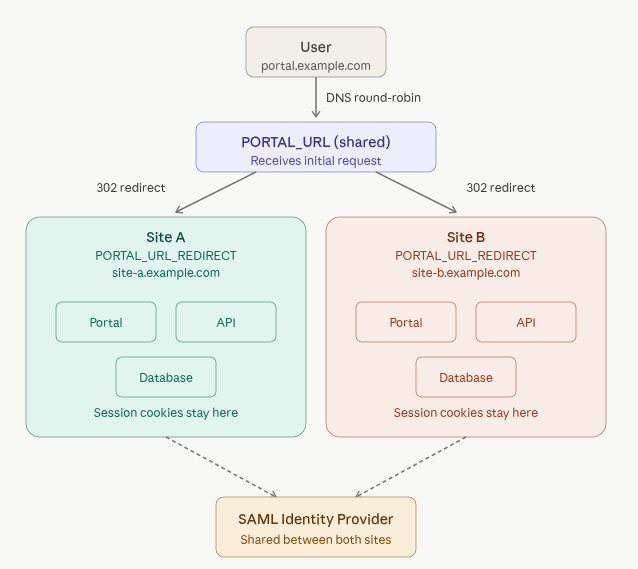
Bi-site deployment with SAML architecture
Note
Users find the same resources and the same rights regardless of which site they are routed to, thanks to the shared SAML authentication. Only their technical session (cookie) is bound to the site on which they landed.
Prerequisites
Before modifying your inventories, make sure you have:
TLS Certificate: A SAN (multi-domain) or Wildcard certificate covering
PORTAL_URLand bothPORTAL_URL_REDIRECTdomains.DNS Routing:
PORTAL_URLmust point to both sites (via GSLB or Round-Robin).Each
PORTAL_URL_REDIRECTmust point exclusively to its respective site (A or B).
SAML Configuration: Both redirect URLs (Site A and B) must be declared as valid ACS (Assertion Consumer Service) endpoints at your identity provider.
Options to Configure
Two variables enable bi-site mode in your inventories:
PORTAL_URLMust be identical on both sites. This is the global public URL entered by users (e.g.
portal.example.com).PORTAL_URL_REDIRECTStrictly unique per site. This is the local URL specific to each infrastructure (e.g.
site-a.example.com), used to lock the technical session.
Ansible Inventory Examples
Site A Inventory
File inventory-site-a.yml:
all:
  vars:
    API_LICENSE: "{{ LICENSING_KEY }}"
    REGISTRY_URL: "registry.reemo.io"
    REGISTRY_ENV: "reemoinfra"
    REGISTRY_USERNAME: "< username >"
    REGISTRY_PASSWORD: "< password >"
  children:
    infra_manager:
      vars:
        PORTAL_URL: "portal.example.com"
        PORTAL_URL_REDIRECT: "site-a.example.com"
        PROVISION_SIGNAL_IP:
          - ip: "192.168.10.66"
        INIT_PROVISION:
          provision1:
            type: "SWARM"
            ip:
              - "192.168.10.100"
      hosts:
        infra_manager1:
          ansible_host: "192.168.10.66"
    provision1:
      children:
        provision1_manager:
          hosts:
            provision1_manager1:
              ansible_host: "192.168.10.100"
Site B Inventory
File inventory-site-b.yml:
all:
  vars:
    API_LICENSE: "{{ LICENSING_KEY }}"
    REGISTRY_URL: "registry.reemo.io"
    REGISTRY_ENV: "reemoinfra"
    REGISTRY_USERNAME: "< username >"
    REGISTRY_PASSWORD: "< password >"
  children:
    infra_manager:
      vars:
        PORTAL_URL: "portal.example.com"
        PORTAL_URL_REDIRECT: "site-b.example.com"
        PROVISION_SIGNAL_IP:
          - ip: "192.168.20.66"
        INIT_PROVISION:
          provision1:
            type: "SWARM"
            ip:
              - "192.168.20.100"
      hosts:
        infra_manager1:
          ansible_host: "192.168.20.66"
    provision1:
      children:
        provision1_manager:
          hosts:
            provision1_manager1:
              ansible_host: "192.168.20.100"
Disabling Bi-site Mode
For a standard single-site deployment, leave PORTAL_URL_REDIRECT
empty or leave it undefined:
all:
  children:
    infra_manager:
      vars:
        PORTAL_URL: "portal.example.com"
        PORTAL_URL_REDIRECT: ""
No redirect will be put in place.