Bastion+ with URL
Overview of a Bastion+ WebSocket setup enabling protocol break and access to a work environment.
Prerequisites
License & Ansible: Reemo API license key and access to the
reemo-infrarole.DNS resolutions:
Portal:
url.domain.tldAdmin:
admin.domain.localRelay:
relayws.domain.tld
SSL certificates: provide
.pemfiles (Cert + Key) for Traefik and the Relayws Traefik.Image access: valid account on the Reemo Docker registry.
Architecture
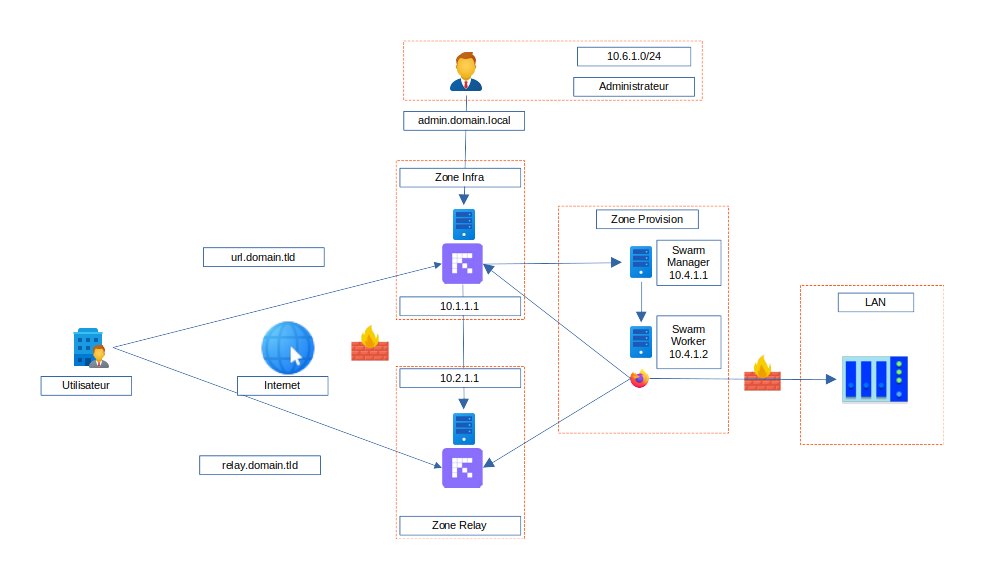
Overview of the infrastructure for a Bastion+ installation with a Dedicated URL
Sizing (10 concurrent sessions)
Machine |
CPU |
RAM |
Disk |
|---|---|---|---|
infra_manager1 |
4 vCPU |
8 GB |
100G SSD |
provision1_manager1 |
10 vCPU |
10 GB |
100G SSD |
relayws_manager1 |
4 vCPU |
4 GB |
50G SSD |
Flow Matrix
DESCRIPTION |
TRANSPORT |
SOURCE IP |
SOURCE PORT |
DESTINATION IP |
DESTINATION PORT |
SERVICES |
|---|---|---|---|---|---|---|
INFRA -> PROVISION |
TCP |
192.168.10.66 |
1024:65535 |
192.168.10.47 |
8443 |
HTTPS |
INFRA -> RELAY |
TCP |
192.168.10.66 |
1024:65535 |
192.168.10.59 |
443,8443 |
HTTPS |
PROVISION -> INFRA |
TCP |
192.168.10.47 |
1024:65535 |
192.168.10.66 |
8443,8446 |
HTTPS |
PROVISION -> RELAY |
TCP |
192.168.10.47 |
1024:65535 |
192.168.10.59 |
443 |
HTTPS |
INTERNET -> INFRA |
TCP |
WAN |
1024:65535 |
192.168.10.66 |
443 |
HTTPS |
INTERNET -> RELAY |
TCP |
WAN |
1024:65535 |
192.168.10.59 |
443 |
HTTPS |
INFRA -> REGISTRY |
TCP |
192.168.10.66 |
1024:65535 |
registry.reemo.io, registry-auth.reemo.io |
443 |
HTTPS |
PROVISION -> REGISTRY |
TCP |
192.168.10.47 |
1024:65535 |
registry.reemo.io, registry-auth.reemo.io |
443 |
HTTPS |
RELAY -> REGISTRY |
TCP |
192.168.10.59 |
1024:65535 |
registry.reemo.io, registry-auth.reemo.io |
443 |
HTTPS |
Ansible Inventory File
all:
  vars:
    API_LICENSE: "< LICENSING_KEY >"
    REGISTRY_URL: "registry.reemo.io"
    REGISTRY_ENV: "reemoinfra"
    REGISTRY_USERNAME: "< username >"
    REGISTRY_PASSWORD: "< password >"
infra_manager:
  vars:
    TRAEFIK_SSL_CERTS:
      - cert_file: "/local/path/ssl/cert.pem"
        key_file: "/local/path/ssl/key.pem"
    PORTAL_URL: "url.domain.tld"
    PROVISION_SIGNAL_IP:
      - ip: "192.168.10.66"
    INIT_PROVISION:
      provision1:
        type: "SWARM"
        ip:
          - "192.168.10.47"
        relayws: "relayws1"
    INIT_RELAYWS:
      relayws1:
        type: "WS_SWARM"
        url: "relayws.domain.tld"
        ip:
          - "192.168.10.59"
    PORTALADMIN_URL: "admin.domain.local"
    PORTALADMIN_URL_RESTRICT_IP: "10.3.1.2,10.3.2.0/24"
    PORTALADMIN_TYPE: "instadmin"
    PORTAL_TYPE: "orguser"
    # credential
    CREDENTIAL_ENABLED: true
    CREDENTIALPORTAL_ENABLED: true
    # vault
    VAULT_ENABLED: true
    VAULT_INIT_FILE: "/path/file/init.crypt"
  hosts:
    infra_manager1:
      ansible_host: "192.168.10.66"
provision:
  children:
    provision1_manager:
      hosts:
        provision1_manager1:
          ansible_host: "192.168.10.47"
relayws_manager:
  vars:
    TRAEFIK_SSL_CERTS:
      - cert_file: "/local/path/ssl/cert.pem"
        key_file: "/local/path/ssl/key.pem"
  hosts:
    relayws_manager1:
      ansible_host: "192.168.10.59"
Ansible Playbook File
reemo-infra.yml
- name: Installation of Reemo Infra Server
  hosts: infra_manager
  gather_facts: "True"
  roles:
    - role: reemo-infra
      become: yes

- name: Install Relayws
  hosts: relayws_manager
  gather_facts: "True"
  roles:
    - role: reemo-infra
      become: yes

- name: Installation of Provision
  hosts: provision
  gather_facts: "True"
  roles:
    - role: reemo-infra
      become: yes
Installation
# Initial deployment — run only once
ansible-playbook -i inventory.yml playbooks/reemo-infra.yml --extra-vars "INIT_DB=true" --extra-vars "INSTALL_DOCKER=true"
Securing the Vault (ansible-vault)
At the end of the first run, you must immediately:
Save the
init.jsonfile in a secure location (password manager, safe, offline encrypted backup).Encrypt the local file with
ansible-vault.
Initial encryption
Immediately after the first run, encrypt the file:
ansible-vault encrypt playbooks/secrets/reemo/vault/init.json
Ansible will ask for a strong passphrase; save it in your password manager.
Note
The passphrase is different from the content of init.json. Save both: the content of init.json and the ansible-vault passphrase.
To re-run the ansible-playbook command, you will then need to provide the password for this file:
ansible-playbook -i inventory.yml playbooks/reemo-infra.yml --ask-vault-pass
Important
If you are using self-signed SSL certificates (test environment only),
close Chrome completely, then launch it with the --ignore-certificate-errors option:
"C:\Program Files\Google\Chrome\Application\chrome.exe" --ignore-certificate-errors
Adjust the path if needed.