User and Administrator Portal
The reemo-infra Ansible role lets you customize each portal using variables defined at the host level in the Inventory file. These variables apply individually to each portal instance.
Portal URLs
By default the Infra and Portal servers respond to all requests with a self-signed certificate.
To set a specific URL for the User Portal, use the PORTAL_URL variable:
all:
    vars:
        API_LICENSE: "ewogICAg ... Uw5NXhGVDF0NFU2TkxOdjQvZU53PT0iCiAgICC9Cn0="
        ...
    infra_manager:
        vars:
            PORTAL_URL: "url.domain.tld"
        hosts:
            infra_manager1:
                ansible_host: "10.0.0.1"
            infra_manager2:
                ansible_host: "10.0.0.2"
            infra_manager3:
                ansible_host: "10.0.0.3"
To set a specific URL for the Administrator Portal, use the PORTALADMIN_URL variable:
all:
    vars:
        API_LICENSE: "ewogICAg ... Uw5NXhGVDF0NFU2TkxOdjQvZU53PT0iCiAgICC9Cn0="
        ...
    infra_manager:
        vars:
            PORTAL_URL: "url.domain.tld"
            PORTALADMIN_URL: "urladmin.domain.ltd"
        hosts:
            infra_manager1:
                ansible_host: "10.0.0.1"
            infra_manager2:
                ansible_host: "10.0.0.2"
            infra_manager3:
                ansible_host: "10.0.0.3"
Important
It is recommended not to expose the Administrator Portal to an external network. This portal is intended to be used within your internal network.
Warning
With PORTALADMIN_URL enabled, administrators can no longer log in via the User Portal URL.
IP filtering
Enable IP filtering on both User and Administrator portals using the PORTAL_URL_RESTRICT_IP and PORTALADMIN_URL_RESTRICT_IP variables:
all:
    vars:
        API_LICENSE: "ewogICAg ... Uw5NXhGVDF0NFU2TkxOdjQvZU53PT0iCiAgICC9Cn0="
        ...
    infra_manager:
        vars:
            PORTAL_URL: "url.domain.tld"
            PORTAL_URL_RESTRICT_IP: "10.1.1.1,10.2.2.0/24"
            PORTALADMIN_URL: "urladmin.domain.ltd"
            PORTALADMIN_URL_RESTRICT_IP: "10.3.1.2,10.3.2.0/24"
        hosts:
            infra_manager1:
                ansible_host: "10.0.0.1"
            infra_manager2:
                ansible_host: "10.0.0.2"
            infra_manager3:
                ansible_host: "10.0.0.3"
Port management
By default the User Portal listens on port 443 with automatic redirection from port 80 to 443 over SSL.
For the Administrator Portal, use the PORTALADMIN_URL_PORT variable to specify a different port:
PORTALADMIN_URL_PORT: "8444"
Warning
The port must be different from 80, 443, and 8443 which are already used by other services.
Portal visual customization
You can apply a visual theme to a portal using the PORTAL_CUSTOMIZATION variable, choosing the theme name freely (e.g. BLUE, BLACK).
PORTAL_CUSTOMIZATION: "BLUE"
Physical separation of Portals
The reemo-infra Ansible role lets you physically separate the User Portal and the Administrator Portal.
Portal dedicated to instance administrators
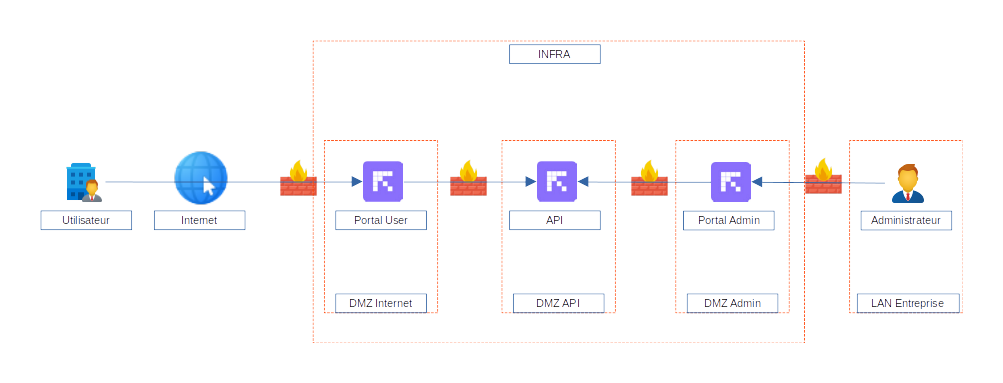
To do this, create an inventory file by replacing the infra_manager group with two separate groups: api_manager and portal_manager.
Note
You must set a HMACSECRET in the variables, shared between the two portals and the API. This secret is used to sign requests from the portals to the API.
all:
    vars:
        API_LICENSE: "ewogICAg ... Uw5NXhGVDF0NFU2TkxOdjQvZU53PT0iCiAgICC9Cn0="
        HMACSECRET: "U6US67D70409RFAGQH5ZIWBFV8HX0UCZ"
portal_manager:
        children:
            portaluser_manager:
                vars:
                    PORTAL_URL: "url.domain.tld"
                    TRAEFIK_SSL_CERTS:
                        - cert_file: "/localpath/to/cert.crt"
                          key_file: "/localpath/to/key.key"
                    API_IP:
                        - ip: "10.3.1.1"
                        - ip: "10.3.1.2"
                        - ip: "10.3.1.3"
                hosts:
                    portaluser1:
                        ansible_host: "10.0.0.1"
                    portaluser2:
                        ansible_host: "10.0.0.2"
                    portaluser3:
                        ansible_host: "10.0.0.3"
            portaladmin_manager:
                vars:
                    PORTAL_URL: "admin.domain.tld"
                    TRAEFIK_SSL_CERTS:
                        - cert_file: "/localpath/to/cert.crt"
                          key_file: "/localpath/to/key.key"
                    API_IP:
                        - ip: "10.3.1.1"
                        - ip: "10.3.1.2"
                        - ip: "10.3.1.3"
                hosts:
                    portaladmin1:
                        ansible_host: "10.0.0.4"
                    portaladmin2:
                        ansible_host: "10.0.0.5"
                    portaladmin3:
                        ansible_host: "10.0.0.6"
api_manager:
        hosts:
            api1:
                ansible_host: "10.3.1.1"
            api2:
                ansible_host: "10.3.1.2"
            api3:
                ansible_host: "10.3.1.3"
Warning
Note that in the example above, the URLs use the PORTAL_URL variable, even for the administrator portal. Use this value when only one portal is declared on a specific server.
Portal dedicated to an SSO
In addition to physical separation you can also restrict SSO connectors per portal.
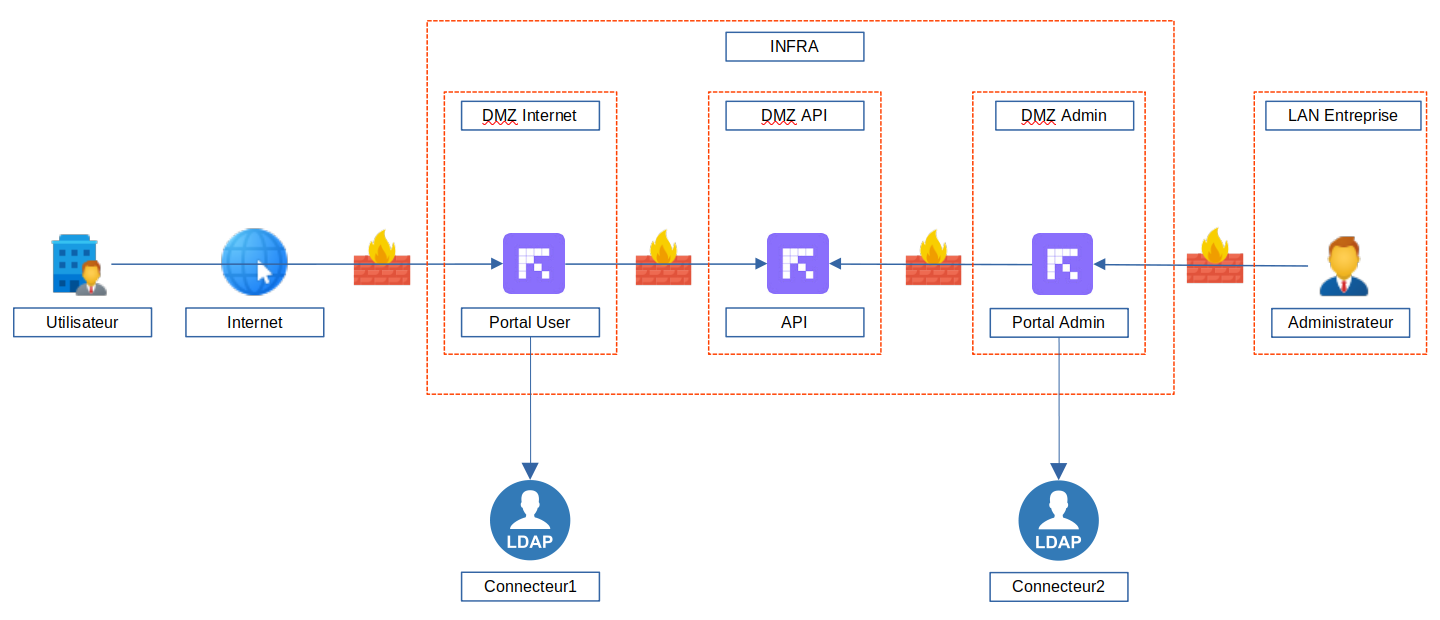
When creating a connector, you obtain a GUID. Enter this GUID in the inventory file, in the targeted portal section, using the PORTAL_LDAP_CONNECTORS variable for LDAP connectors or PORTAL_SAML_CONNECTORS for SAML connectors:
all:
    vars:
        API_LICENSE: "ewogICAg ... Uw5NXhGVDF0NFU2TkxOdjQvZU53PT0iCiAgICC9Cn0="
        HMACSECRET: "..."
portal_manager:
        children:
            portalsso_manager:
                vars:
                    PORTAL_URL: "urlldap.domain.tld"
                    TRAEFIK_SSL_CERTS:
                        - cert_file: "/localpath/to/cert.crt"
                          key_file: "/localpath/to/key.key"
                    PORTAL_LDAP_CONNECTORS:
                        - ldapid: "3182932d-9ee1-4c06-a4cf-c13c25f2ee93"
                    PORTAL_SAML_CONNECTORS:
                        - samlid: "692469bd-cb28-8332-aa65-9c95451c1a0e"
                hosts:
                    portalsso1:
                        ansible_host: "10.0.0.7"
                    portalsso2:
                        ansible_host: "10.0.0.8"
                    portalsso3:
                        ansible_host: "10.0.0.9"
To add multiple connectors to the same portal, add multiple ldapid or samlid lines:
all:
    vars:
        API_LICENSE: "ewogICAg ... Uw5NXhGVDF0NFU2TkxOdjQvZU53PT0iCiAgICC9Cn0="
        HMACSECRET: "..."
portal_manager:
        children:
            portalsso_manager:
                vars:
                    PORTAL_URL: "urlsso.domain.tld"
                    TRAEFIK_SSL_CERTS:
                        - cert_file: "/localpath/to/cert.crt"
                          key_file: "/localpath/to/key.key"
                    PORTAL_LDAP_CONNECTORS:
                        - ldapid: "3182932d-9ee1-4c06-a4cf-c13c25f2ee93"
                        - ldapid: "9c713681-b758-4179-b9a2-13618a7b804e"
                    PORTAL_SAML_CONNECTORS:
                        - samlid: "692469bd-cb28-8332-aa65-9c95451c1a0e"
                        - samlid: "4418cfb9-52c5-4d7c-88d1-7660e7809d23"
                hosts:
                    portalsso1:
                        ansible_host: "10.0.0.7"
                    portalsso2:
                        ansible_host: "10.0.0.8"
                    portalsso3:
                        ansible_host: "10.0.0.9"
For a dedicated administrator portal, use PORTALADMIN_SAML_CONNECTORS instead of PORTAL_SAML_CONNECTORS to restrict SAML connectors available specifically on that portal:
all:
    vars:
        API_LICENSE: "ewogICAg ... Uw5NXhGVDF0NFU2TkxOdjQvZU53PT0iCiAgICC9Cn0="
        HMACSECRET: "..."
portal_manager:
    children:
        portaluser_manager:
            vars:
                PORTAL_URL: "url.domain.tld"
                PORTAL_SAML_CONNECTORS:
                    - samlid: "692469bd-cb28-8332-aa65-9c95451c1a0e"
            hosts:
                portaluser1:
                    ansible_host: "10.0.0.1"
        portaladmin_manager:
            vars:
                PORTAL_URL: "admin.domain.tld"
                PORTALADMIN_SAML_CONNECTORS:
                    - samlid: "236cc1d9-a87d-4f16-becb-6cd6a0bba67f"
            hosts:
                portaladmin1:
                    ansible_host: "10.0.0.4"
Signal Server per Portal
To fully separate the portals, assign specific Signal servers to each portal using the PROVISION_SIGNAL_IP variable. These servers will be used by the containers launched from these portals:
portal_manager:
    vars:
        API_IP:
            - ip: "10.0.0.1"
    children:
        portal1_user:
            hosts:
                portal1_user1:
                    ansible_host: "10.0.0.2"
                    PORTAL_URL: "portal1.domain.tld"
                    PROVISION_SIGNAL_IP:
                        - ip: "10.0.0.2"
        portal2_user:
            hosts:
                portal2_user1:
                    ansible_host: "10.0.0.3"
                    PORTAL_URL: "portal2.domain.tld"
                    PROVISION_SIGNAL_IP:
                        - ip: "10.0.0.3"
Routing by container provider tags
The PORTAL_CONTAINER_PROVIDERS_TAGS variable restricts which container providers are available from a given portal. Only providers whose tags match this list will serve container sessions for that portal:
portal_manager:
    vars:
        API_IP:
            - ip: "10.0.0.1"
    children:
        portal1_user:
            hosts:
                portal1_user1:
                    ansible_host: "10.0.0.2"
                    PORTAL_URL: "portal1.domain.tld"
                    PORTAL_CONTAINER_PROVIDERS_TAGS:
                        - tag: "blue"
        portal2_user:
            hosts:
                portal2_user1:
                    ansible_host: "10.0.0.3"
                    PORTAL_URL: "portal2.domain.tld"
                    PORTAL_CONTAINER_PROVIDERS_TAGS:
                        - tag: "black"
In this example, portal1_user1 only has access to providers tagged blue, and portal2_user1 only to providers tagged black.
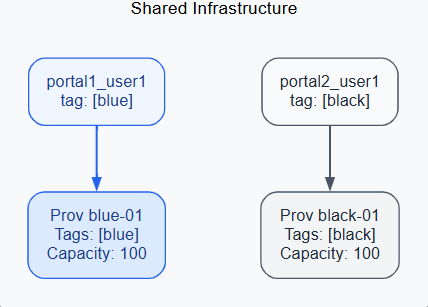
Tag-based routing: each portal only deploys to providers whose tags match PORTAL_CONTAINER_PROVIDERS_TAGS.
Note
Container provider tags are assigned from verified_user Admin area > view_in_ar Containers & Workstations > dns Container Providers (Tags field, see Create a Direct Container Provider). Tag names are case-sensitive and must exactly match the values defined in PORTAL_CONTAINER_PROVIDERS_TAGS.
Filtering user roles on a Portal
You can restrict the type of users allowed to connect to a specific portal. Filtering is based on the user role.
Instance Administrator
Organization Administrator
Organization Member
Main Portal
By default, all users can authenticate on a portal. With the PORTAL_TYPE variable, you can restrict access to a specific user type:
PORTAL_TYPE |
default |
user |
admin |
orgadmin |
instadmin |
orguser |
|---|---|---|---|---|---|---|
Instance Administrator |
||||||
Organization Administrator |
||||||
Organization Member |
Admin Portal
The secondary portal is configured by default for administrators. With the PORTALADMIN_TYPE variable, you can specify which types of administrators can log in:
PORTALADMIN_TYPE |
default |
orgadmin |
instadmin |
|---|---|---|---|
Instance Administrator |
|||
Organization Administrator |
|||
Organization Member |
Example with a portal dedicated to users and the admin portal dedicated only to instance administrators:
all:
    vars:
        API_LICENSE: "ewogICAg ... Uw5NXhGVDF0NFU2TkxOdjQvZU53PT0iCiAgICC9Cn0="
        HMACSECRET: "..."
portal_manager:
    children:
        portaluser_manager:
            vars:
                PORTAL_URL: "url.domain.tld"
                PORTAL_TYPE: "user"
                TRAEFIK_SSL_CERTS:
                    - cert_file: "/localpath/to/cert.crt"
                        key_file: "/localpath/to/key.key"
            hosts:
                portaluser1:
                    ansible_host: "10.0.0.1"
                portaluser2:
                    ansible_host: "10.0.0.2"
                portaluser3:
                    ansible_host: "10.0.0.3"
        portaladmin_manager:
            vars:
                PORTAL_URL: "admin.domain.tld"
                PORTAL_TYPE: "instadmin"
                TRAEFIK_SSL_CERTS:
                    - cert_file: "/localpath/to/cert.crt"
                        key_file: "/localpath/to/key.key"
            hosts:
                portaladmin1:
                    ansible_host: "10.0.0.4"
                portaladmin2:
                    ansible_host: "10.0.0.5"
                portaladmin3:
                    ansible_host: "10.0.0.6"
api_manager:
    hosts:
        api1:
            ansible_host: "10.3.1.1"
        api2:
            ansible_host: "10.3.1.2"
        api3:
            ansible_host: "10.3.1.3"
Hiding the admin area
On a portal without dedicated physical separation, use the PORTAL_DISABLE_ADMIN_AREA variable to hide the admin area for users who log in through it:
portal_manager:
    vars:
        API_IP:
            - ip: "10.0.0.1"
    children:
        portal1_user:
            hosts:
                portal1_user1:
                    ansible_host: "10.0.0.2"
                    PORTAL_URL: "portal1.domain.tld"
                    PORTAL_DISABLE_ADMIN_AREA: true
        portal2_user:
            hosts:
                portal2_user1:
                    ansible_host: "10.0.0.3"
                    PORTAL_URL: "portal2.domain.tld"
                    PORTAL_DISABLE_ADMIN_AREA: false
In this example, administrators logging in via portal1.domain.tld cannot access the admin area, even if they have the required rights. They must use portal2.domain.tld to access it.
Note
PORTAL_DISABLE_ADMIN_AREA hides access to the interface, regardless of the user’s role. To restrict authentication itself based on role, use PORTAL_TYPE / PORTALADMIN_TYPE instead (see above).