Verification and Troubleshooting
Post-deployment checks
Vault is unsealed and operational
docker exec $(docker ps --filter name=reemo_vault1. -q) bao status
Expected output:
Key                     Value
---                     -----
Sealed                  false
In Raft mode, also check all 3 replicas:
for n in 1 2 3; do
  echo "=== Replica $n ==="
  docker exec $(docker ps --filter name=reemo_vault${n}. -q) bao status
done
Raft cluster: list members
ROOT=$(jq -r .root_token playbooks/secrets/reemo/vault/init.json)
docker exec -e BAO_TOKEN=$ROOT $(docker ps --filter name=reemo_vault1. -q) bao operator raft list-peers
Expected output: the 3 replicas listed, with one leader and two followers.
CredentialAPI and its token
# Docker secret exists
docker secret ls | grep reemo_VAULT_TOKEN

# Token has a period (720h)
TOKEN=$(docker exec $(docker ps --filter name=reemo_credentialapi. -q | head -1) cat /run/secrets/reemo_VAULT_TOKEN)
docker exec -e BAO_TOKEN=$TOKEN $(docker ps --filter name=reemo_vault1. -q) bao token lookup
Check these values:
period=720hrenewable=truettlclose to 720h (renewed every 6h)policies=[credentialapi-admin default]
Supercronic is running in the container
docker exec $(docker ps --filter name=reemo_credentialapi. -q | head -1) ps aux | grep supercronic
You should see an active supercronic process. To view renewal logs:
docker logs $(docker ps --filter name=reemo_credentialapi. -q | head -1) 2>&1 | grep renew
Manual renewal test:
docker exec $(docker ps --filter name=reemo_credentialapi. -q | head -1) /usr/local/bin/renew-vault-token.sh
Expected output:
[2026-06-08 12:34:56] [renew-vault-token] [INFO] Token renewed successfully, new TTL: 2592000s (720h)
Troubleshooting
Vault is sealed after a restart
What does this mean?
After a restart, Vault automatically returns to a “sealed” state for security reasons. It must be “unsealed” to restore access.
How to identify the issue?
A sealed Vault appears in three different ways:
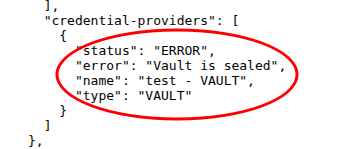
API endpoint /api/healthcheck
Go to
https://your-portal/api/healthcheck. Undercredential-providers, you will see:"status": "ERROR", "error": "Vault is sealed"
Web interface: verified_user Administration Area > build System > monitor_heart Service Status
Vault displays an Error status with the description Vault is sealed.

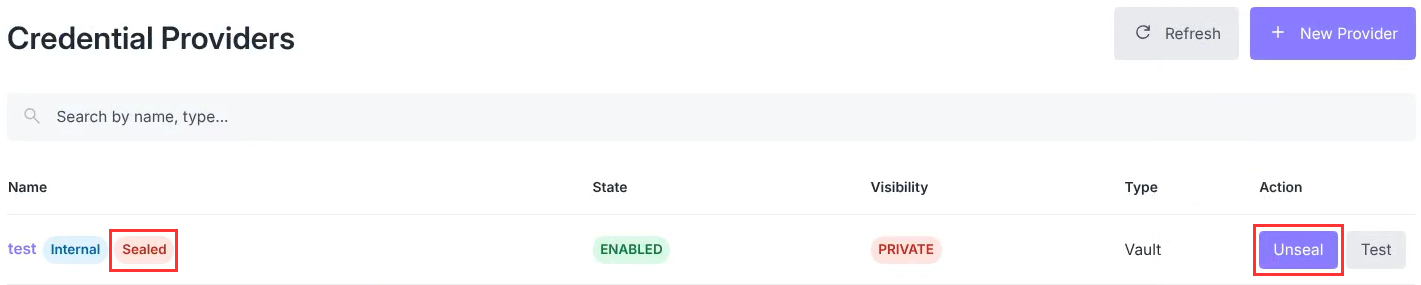
Web interface: verified_user Administration Area > key Credentials > enhanced_encryption Credential providers
The Vault card shows a red Sealed tag with the Unseal button available.
How to fix it?
Two paths depending on your context:
Situation |
Action |
|---|---|
Ansible runner available |
Re-run the full playbook (automatic unsealing): ansible-playbook -i inv playbook/reemo-infra.yml --tags vault
|
Runner unavailable or isolated intervention |
Unseal manually via the web interface: see manual procedure (you will need the |
Playbook has lost init.json
Symptom: Vault is initialized but no init.json found at <path>.
Cause: file deleted or playbook run from a different runner without this backup.
Solution:
Retrieve
init.jsonfrom your password managerRecreate the file:
mkdir -p playbooks/secrets/reemo/vault
chmod 700 playbooks/secrets/reemo/vault
# Write the json to playbooks/secrets/reemo/vault/init.json
chmod 600 playbooks/secrets/reemo/vault/init.json
Re-encrypt with ansible-vault if needed.
Re-run the playbook:
ansible-playbook -i inv playbook/reemo-infra.yml --tags vault
CredentialAPI token TTL is decreasing
Symptom: TTL drops progressively (700h → 680h → …) instead of staying at ~720h.
Cause: supercronic is not renewing the token every 6h.
Diagnosis:
Check that supercronic is running:
docker exec $(docker ps --filter name=reemo_credentialapi. -q | head -1) ps aux | grep supercronic
Check the renewal logs:
docker service logs reemo_credentialapi --tail 200 | grep renew
Note
A TTL of 700h–720h is normal. A TTL < 0 is alarming.
Solution:
Restart the service:
docker service update --force reemo_credentialapi
Permission Denied
Symptom: Communication with Vault no longer works. Error message in the healthcheck: Permission Denied.
Cause: The token used by CredentialAPI is no longer valid.
Diagnosis:
Check the token status:
TOKEN=$(docker exec $(docker ps --filter name=reemo_credentialapi. -q | head -1) cat /run/secrets/reemo_VAULT_TOKEN)
docker exec -e BAO_TOKEN=$TOKEN $(docker ps --filter name=reemo_vault1. -q) bao token lookup
Solution:
Remove the CredentialAPI service:
docker service rm reemo_credentialapi
Remove the Vault token secret:
docker secret rm reemo_VAULT_TOKEN
Redeploy CredentialAPI via reemo-infra:
ansible-playbook -i inventory.yml playbooks/reemo-infra.yml --tags vault,credentialapi