Portals
A portal is the web entry point of a Reemo instance: the interface through which users authenticate and then reach their resources. An instance can expose several distinct portals, each with its own URL, access rules, and appearance.
This model lets you address different audiences (users, administrators, partners) with tailored security levels and resource scopes.
Several portals, detached from the API core
Portals are the web frontends; the application core (API) is a separate environment. Portals can therefore be detached from the API and deployed on their own servers — typically in an exposed zone (DMZ), while the API stays in an internal zone.
Every request from a portal to the API is signed (shared HMAC secret) and travels over mTLS, so the core only accepts legitimate portals.
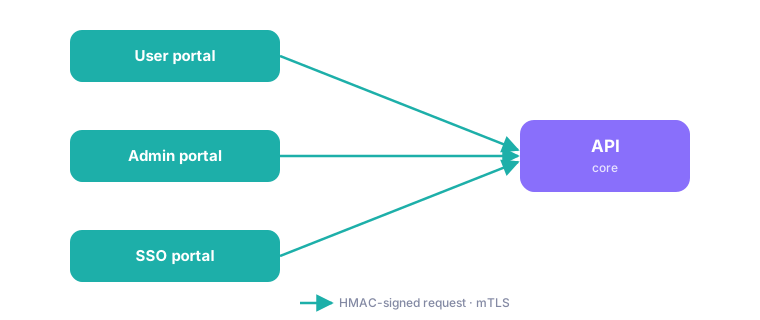
Several portals detached from the API core, each request HMAC-signed and encrypted over mTLS.
Rights and customization per portal
Each portal is configured independently: who can log in (the rights), what it exposes, and how it looks (the customization).
On the rights side, access is filtered by the user’s role:
Instance administrator
Organization administrator
Organization member
For example, a portal may accept only organization members, while an admin portal, in an internal zone, accepts only instance administrators.
The following table summarizes what can vary from one portal to another:
Capability |
Description |
Variable |
|---|---|---|
Allowed roles (rights) |
Restricts the user types allowed to log in. |
|
Administration area |
Shows or hides the administration area on the portal. |
|
Authentication connectors |
Limits the SSO connectors (LDAP, SAML) offered at login. |
|
Visible resources |
Limits the accessible container providers, by tags. |
|
Visual theme (color) |
Applies a visual customization to the portal. |
|
Network filtering |
Restricts access to the portal by IP address. |
|
Dedicated Signal server |
Assigns a specific Signal server to the sessions started from the portal. |
|
See also
User and administrator portal (installation) — Detailed portal configuration in the reemo-infra role.
See also
Environments — Where portals fit among the environments of an instance.