Connection lifecycle
A Reemo session connects a user to a resource in real time. Understanding how it unfolds — from the portal to the resource — helps place each component (portal, Signal, relay, agent) in the chain.
How a connection unfolds
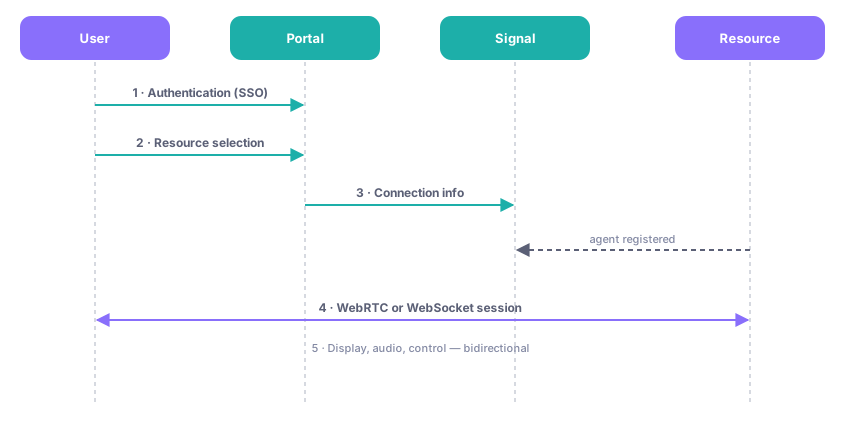
The steps of establishing a session, from the portal to the resource.
Portal access: the user opens the web portal and signs in — directly or through an identity provider (SSO).
Resource selection: they choose the machine, container, or application to connect to.
Signaling: the Signal service provides the information needed to establish the connection between the user and the resource. Agents have registered with it beforehand.
Session setup: the connection is established with the best available transport — direct WebRTC, WebRTC relayed through a TURN server, or WebSocket through a RELAYWS relay.
Active session: the resource (Reemo Desktop agent, container, or virtual machine) joins the session; display, audio, and control events flow in both directions.
The role of the Signal service
The Signal service has two jobs: registering Reemo agents on the platform, and exchanging the information needed to establish a connection between the user and their resource. Users reach it through the portal (port 443); agents register with it on port 8443.
Establishing the session
The chosen transport depends on the network and the infrastructure choice (see Protocol and connection modes):
Direct WebRTC: a peer-to-peer link, negotiated by ICE and STUN.
Relayed WebRTC: an automatic fallback through a TURN server when no direct link is possible.
WebSocket: a dedicated relay container is created for the connection by the RELAYWS environment.