Maintenances
Follow the planned, in-progress and past maintenances of the organization, and edit, end or cancel them.
Access: domain Organization > inventory_2 Inventory > construction Maintenances.
A maintenance closes a target (a resource, a container profile, a group or a collection) to users for a period, with a message. To put a target in maintenance, see Put in Maintenance.
Follow Maintenances
The list shows the target, the period and its notice, the message, the requester and the status (Planned, In progress, Ended or Cancelled). Filter it with Planned, In progress, Finished or All; each filter shows its number of maintenances. From a group of the menu, the Maintenances entry only shows the maintenances of that group and of its sub-groups.
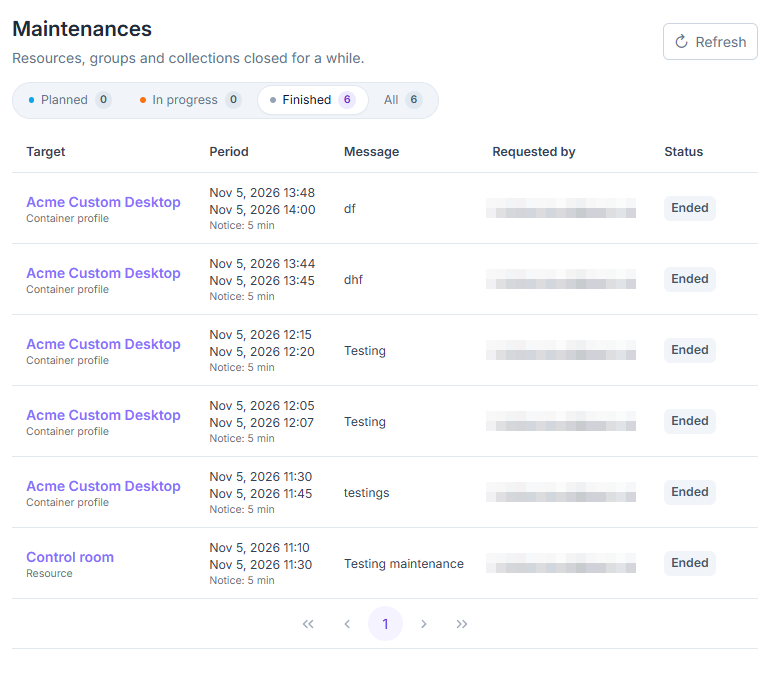
List of the organization’s maintenances, filtered on the finished ones.
A maintenance in progress or planned also shows at the top of the page of the resource, container profile or collection, and in the group’s Maintenance tab, with its period and message. It reads Through the group or Through the collection when it comes from one of them.
A container profile whose container provider is in maintenance reads Through the container provider, without buttons: only instance administrators manage this maintenance, and it does not appear in the list above.
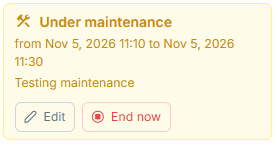
Maintenance notice on the page of a resource.
In the lists of resources, container profiles and collections, the Under maintenance or Planned maintenance tag marks the items concerned. In the menu, the groups concerned carry the Maintenance tag.
Edit, End or Cancel a Maintenance
From the maintenance notice, on the page of the target or on its row in the list:
Edit: change the message, the start or the end, then click Save. The start can only be changed until the maintenance begins. To extend a maintenance, choose a later end. A moved start restarts the full notice for open sessions.
End now for a maintenance in progress, or Cancel for a planned one: confirm. After End now, users can connect again right away.
A target has only one maintenance at a time over a given period: a maintenance overlapping another one on the same target is refused.